The 10 Best Customer Support Automation Tools in 2026
The best customer support automation tools in 2026, ranked, with real September 2026 pricing for all ten, screenshotted from every vendor's own site.
We build one of these tools. Every price and feature below comes from the vendor’s own pricing page, checked in September 2026, screenshots included.
The best customer support automation tools in 2026 split into two camps: helpdesks that bolted AI onto an inbox, and AI-first agents built to run the conversation end to end. Every vendor on this list shipped an “AI Agent” product in the last eighteen months, and Gartner’s own forecast is why: agentic AI is expected to resolve 80% of common service issues without a human by 2029. Ten tools, ranked, with what each one actually costs this month.
The best customer support automation tools in 2026 for most businesses are Joe for flat-priced, phone-plus-chat coverage, Zendesk for large support teams that need scale, Intercom’s Fin for AI-first chat and email, and Gorgias for Shopify stores. All ten, with real September 2026 pricing, are below.
How we picked
You might have typed something else to land here. “Best help desk software,” “ai customer service software,” “customer service automation platform,” “customer support automation software,” “ai customer support tools,” “help desk automation software,” take your pick. Nine of them pull up some mix of the same names, plus whichever one paid to be first. Here’s how we actually picked.
Three things, checked against each vendor’s own site rather than their sales deck.
Channel coverage that isn’t just chat with extra steps. Most of this category still calls itself “omnichannel” and means “a helpdesk inbox plus a chat widget, both answering 24/7.” Phone, the channel every one of these businesses had before any of this software existed, is missing or sold as an add-on almost everywhere.
Pricing you can see without booking a call. Half the “best of 2026” lists in this space rank a tool number one and then link you to a page that says “contact sales.” We counted that against a tool, every time.
Whether the AI can invent an answer. This is the one we care about most, because it’s the one that gets a business in trouble. A support agent that follows a defined flow and only calls the model inside guardrails will beat a free-running one on every metric a business owner cares about: accuracy, refunds that don’t get invented, escalations that actually happen when they should. If you’re building that flow yourself, our guide to writing a chatbot script walks through the actual nodes and intents.
Judge the list on whether the facts below hold up.
Best customer support automation tools 2026: the 10 at a glance
| # | Tool | Best for | Phone support | Starts at |
|---|---|---|---|---|
| 1 | We Love Joe | Phone + chat + social on one flow | Native | From €59/mo, flat |
| 2 | Zendesk | Large, multi-department support teams | Add-on from mid tier | $19/agent/mo |
| 3 | Intercom (Fin) | AI-first chat and email at speed | No | $19/seat/mo + $0.99/outcome |
| 4 | Freshdesk | Budget helpdesk with AI bolted on | No | $19/agent/mo |
| 5 | Help Scout | Small teams who want a calm shared inbox | No | $25/user/mo |
| 6 | Gorgias | Shopify and ecommerce support | $25/mo add-on | $77/mo |
| 7 | Zoho Desk | Cheapest ticketing system with AI | No | $7/user/mo |
| 8 | Ada | Enterprise AI agent across voice, chat, email | Yes, enterprise tier | Custom, sales call |
| 9 | HubSpot Service Hub | Support living inside your CRM | No | $90/seat/mo |
| 10 | Tidio | Cheap live chat for small sites | No | $24.17/mo |
1. We Love Joe: phone, chat and social on one flow
The reason Joe exists is that every tool in this list treats the phone like a legacy problem someone else should solve. Look at the table above again. Gorgias sells voice as a $25 add-on. Zendesk buries it behind Suite Team. Ada only ships it on the enterprise tier you have to book a call for. Everyone else just doesn’t have it.
Joe runs one conversation flow, built once per business, across phone, WhatsApp, Instagram, Messenger, SMS, email and web chat, all landing in a single inbox with one set of escalation rules instead of one per channel. The flow is deterministic on purpose: a fixed graph of nodes that the model operates inside, not a free-running agent that can improvise a refund policy at 2am. About 80% of that flow is pre-built (the nodes, the actions, the integrations); the remaining fifth is the business’s own logic, which is the part that actually needs a human’s judgment.
On one real estate client’s account, after-hours calls used to go straight to voicemail. Joe now captures 100% of them and resolves half with no human needed, which is the kind of number a chat-only tool from this list structurally can’t produce, since there’s no phone call to capture in the first place.
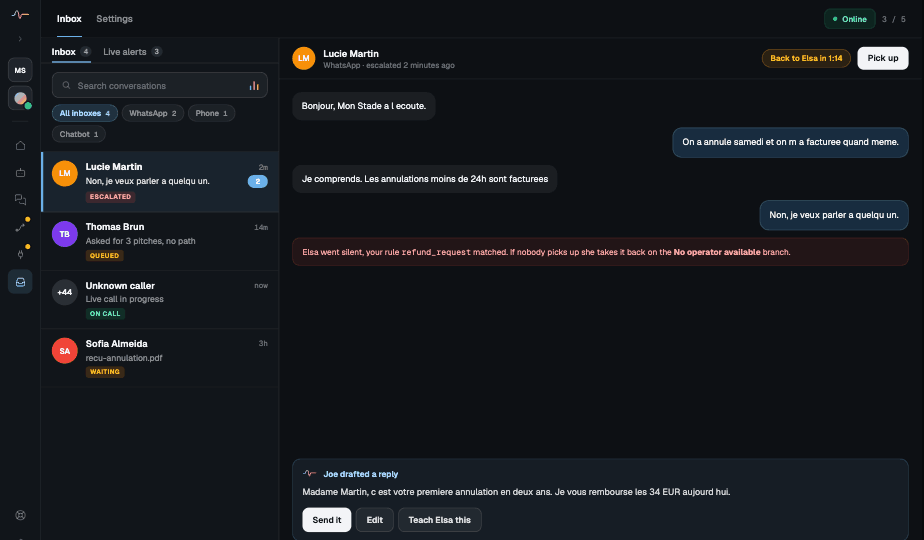
Pricing is usage-based credits from €59 a month, hosted in Europe, with bring-your-own-key available for larger accounts that want to own the model relationship outright. The screenshot below isn’t a mockup, it’s a real escalation: a cancellation request that matched a refund rule, went quiet on the automated branch, and got handed to a human with the reason attached.
Best for: businesses and franchise networks where the phone still carries real volume, not just chat.
2. Zendesk: the safe choice for a large support team
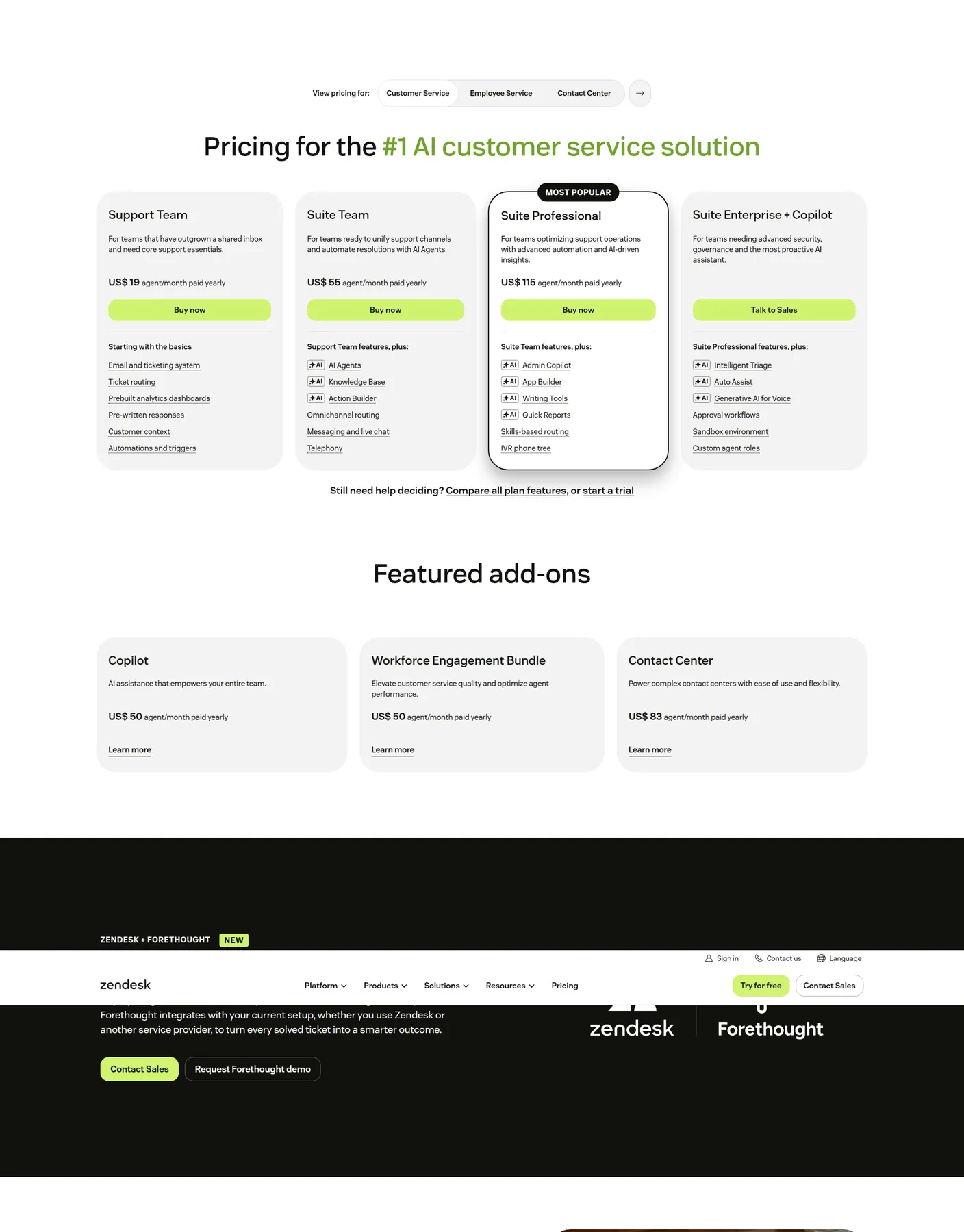
Zendesk is the tool most of the other nine lists on this topic default to, and there’s a reason: it scales, it integrates with almost anything, its analytics dashboards actually get used, and buying it has never gotten anyone fired. Four tiers, from a $19-a-month Support Team plan with just ticketing up to Suite Enterprise + Copilot, which needs a sales call. AI Agents and the Copilot assistant land on Suite Team and up, and the phone tree only shows up at Suite Professional, $115 per agent a month.
Best for: support teams past 20 agents who need the ticketing depth and don’t mind per-agent pricing.
3. Intercom (Fin): fast, AI-first, priced per outcome
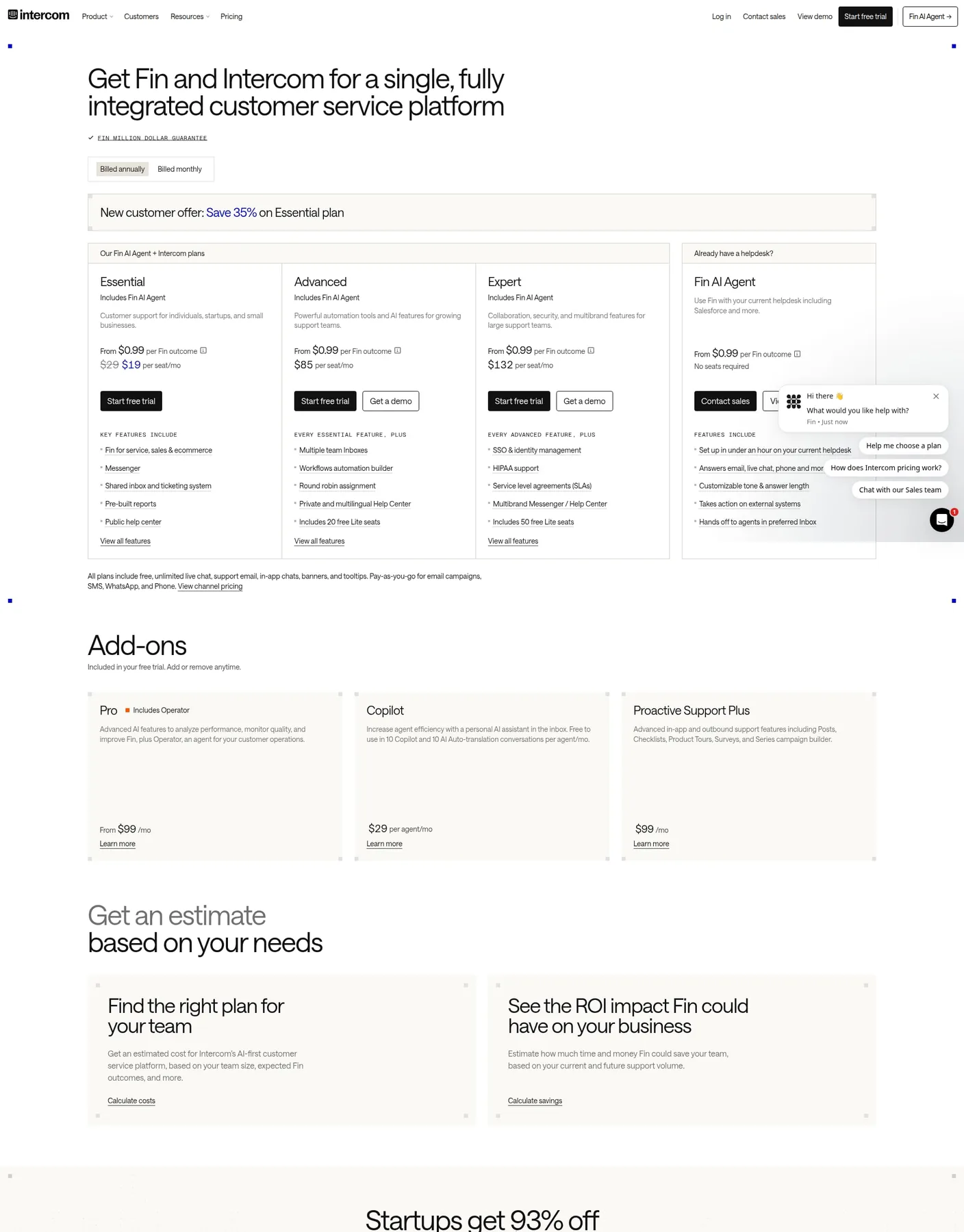
Intercom rebuilt itself around Fin, its AI agent, and it shows: the seat price ($19/mo on the current promo, normally $29, up to $132 on Expert) is almost secondary to the real cost driver, which is $0.99 for every conversation Fin actually resolves. That’s honest pricing in one sense, since you’re not paying for outcomes you don’t get, and unpredictable in another, since a good month for your business is an expensive month for your Intercom bill.
No native phone. Everything else, chat, email, a shared inbox, is genuinely fast to set up, which is why it shows up as the “AI-first” pick on almost every competing list we checked.
Best for: SaaS and ecommerce teams that live in chat and email and want the newest AI-agent tech.
4. Freshdesk: the budget helpdesk that added an AI agent
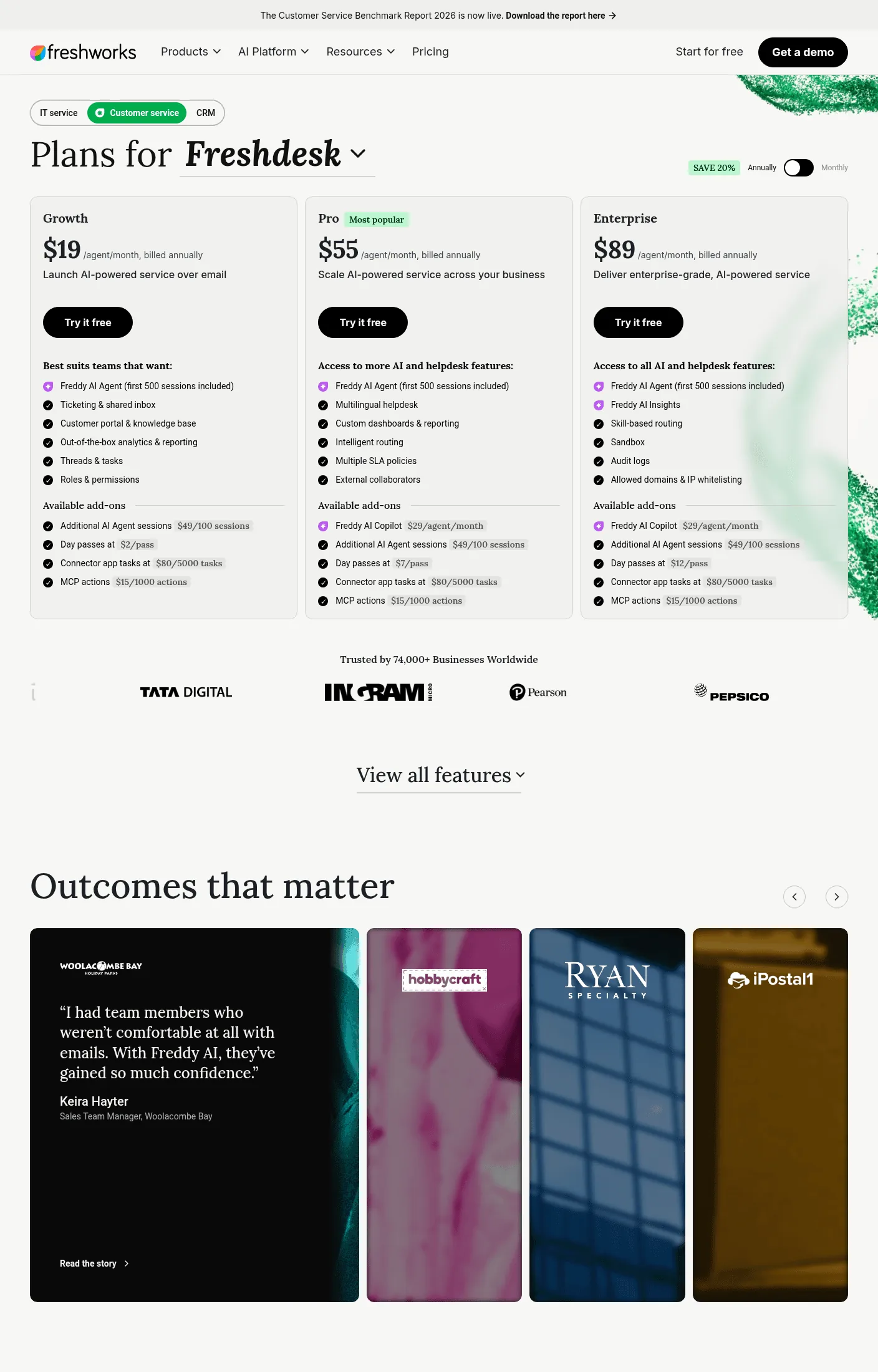
Freshdesk undercuts Zendesk on list price at every tier ($19 / $55 / $89 versus $19 / $55 / $115), and its Freddy AI Agent comes with 500 free sessions a month before $49 per additional 100. For a support desk that’s mostly ticket volume with the occasional chat, that’s a fair trade.
It reads, correctly, as “Zendesk for a smaller budget” rather than as its own category. Nothing wrong with that if ticketing is genuinely your whole problem.
Best for: teams that want Zendesk-shaped ticketing without the Zendesk-shaped invoice.
5. Help Scout: the calm option for a small team
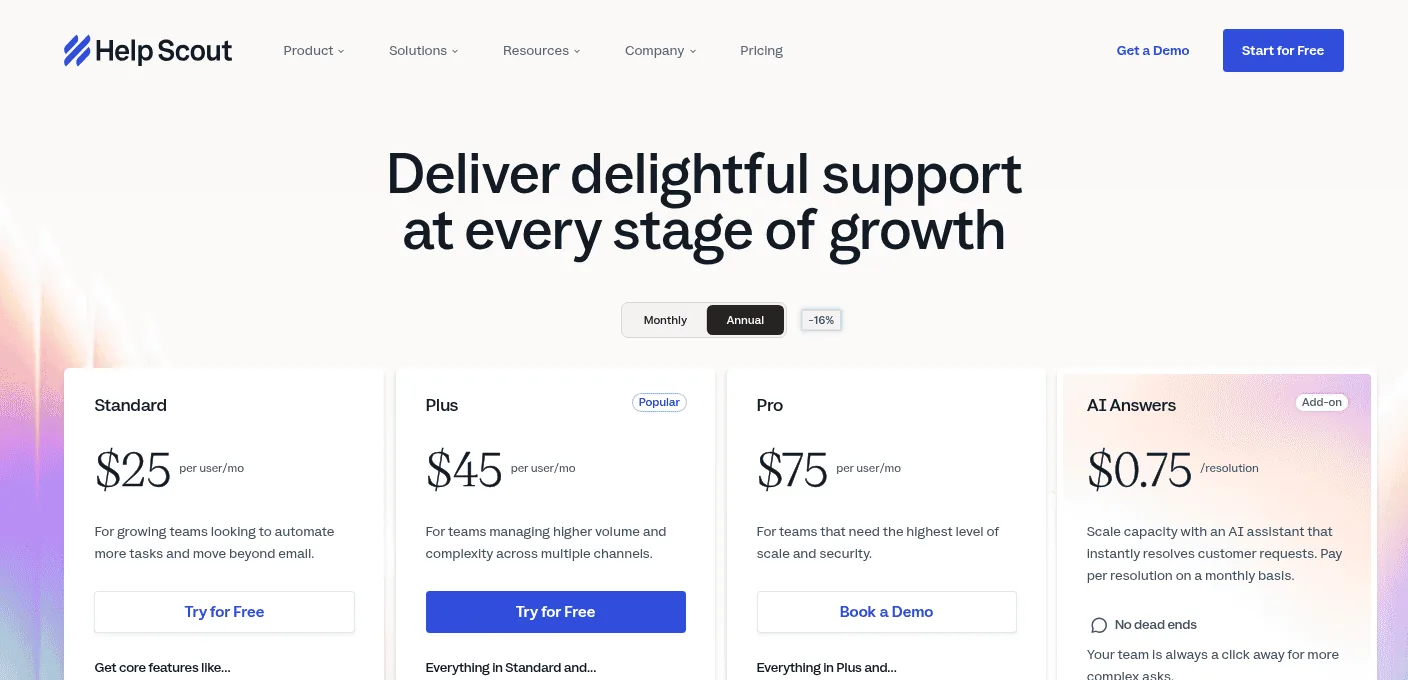
Help Scout is the one tool on this list that isn’t trying to be an AI platform first. It’s a shared inbox, done well, with an AI Inbox assistant on the Standard plan ($25/user/mo) and an AI Answers add-on billed at $0.75 per resolution on top. No phone, no complicated workflow builder, just a clean inbox that a five-person team can run without a training session.
Best for: small teams who tried a “smart” tool, found it exhausting, and want something a new hire understands in an hour.
6. Gorgias: built for Shopify, not adapted for it
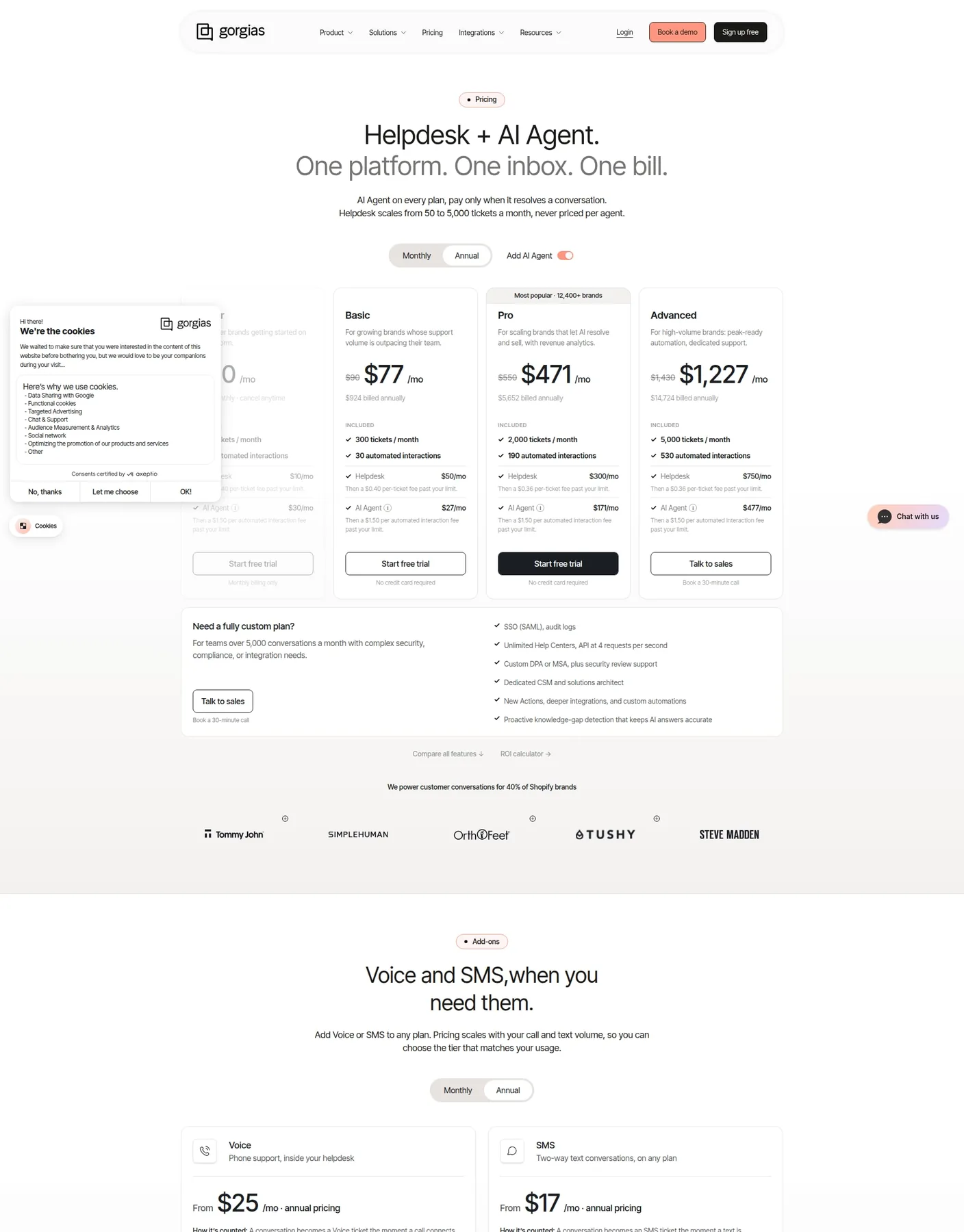
Gorgias is the one entry here that isn’t trying to serve every business, and it’s better for it. Pricing runs by ticket volume, not seats: Basic at $77/month for 300 tickets, up to Advanced at $1,227/month for 5,000, with the AI Agent billed separately per automated interaction on top of each tier. Voice and SMS are both add-ons, from $25 and $17 a month.
Best for: Shopify, BigCommerce, Magento or WooCommerce stores that want support wired straight into order data.
7. Zoho Desk: the cheapest way into ticketing with AI
If budget is the whole conversation, Zoho Desk wins it outright: Express starts at $7 a user a month, and even Professional, where the Zia AI assistant comes included, is $23. That’s a third of what the next-cheapest AI-capable tool on this list charges.
The tradeoff shows up in polish, not function: it does the job, and it looks and feels like enterprise software from 2019 doing it.
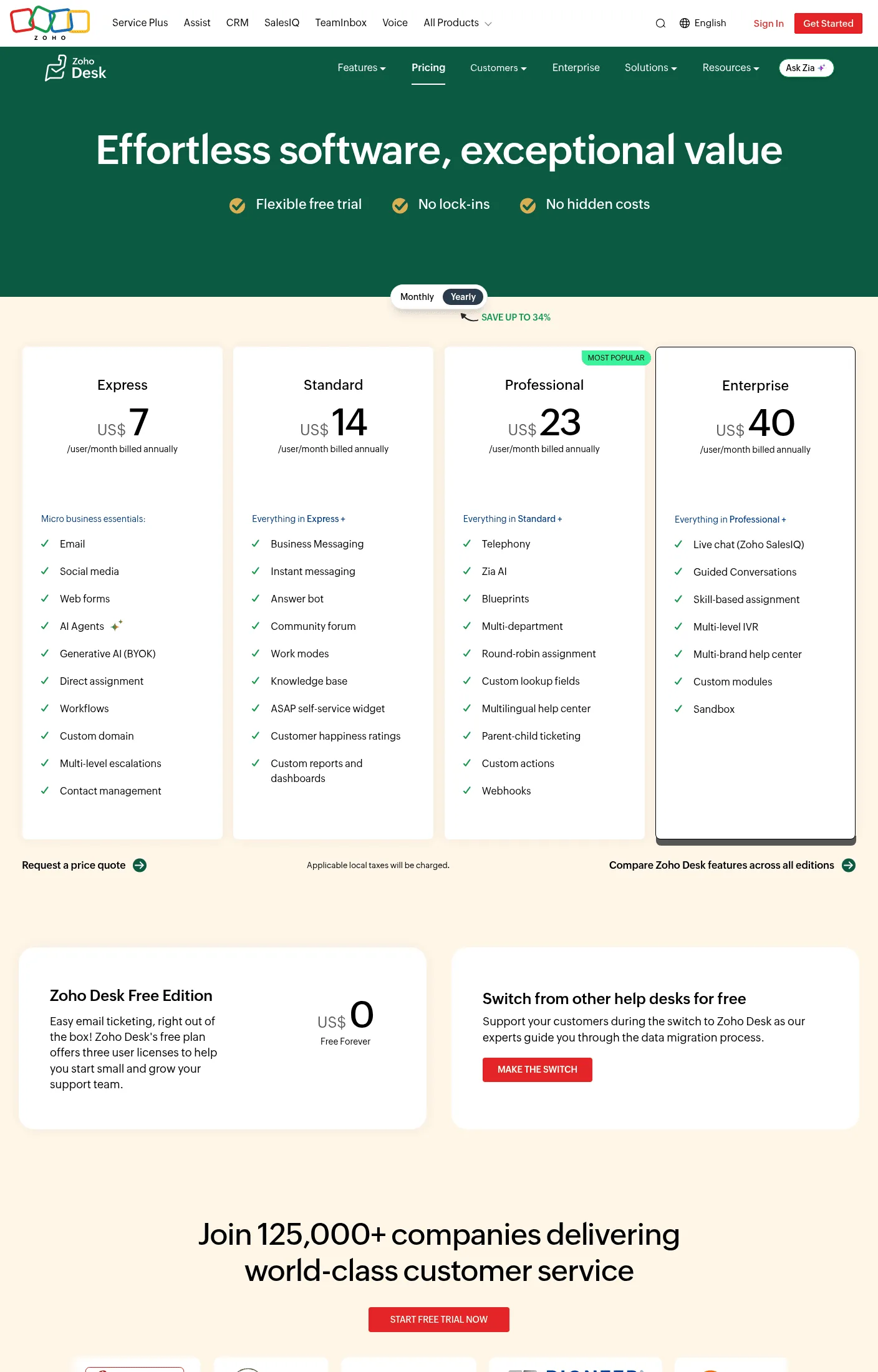
Best for: a business that needs ticketing and AI triage and genuinely cannot justify $50 a seat.
8. Ada: enterprise AI across voice, chat and email, if you can get a price
Ada is ai customer support software built for the same problem Joe is (one AI agent across channels including voice, not a chat bolt-on), aimed at a different customer: large enterprises running consultations instead of self-serve signups. There’s no public pricing anywhere on the site, only a “Speak to an expert” button, which tells you who they’re selling to before a single feature does.
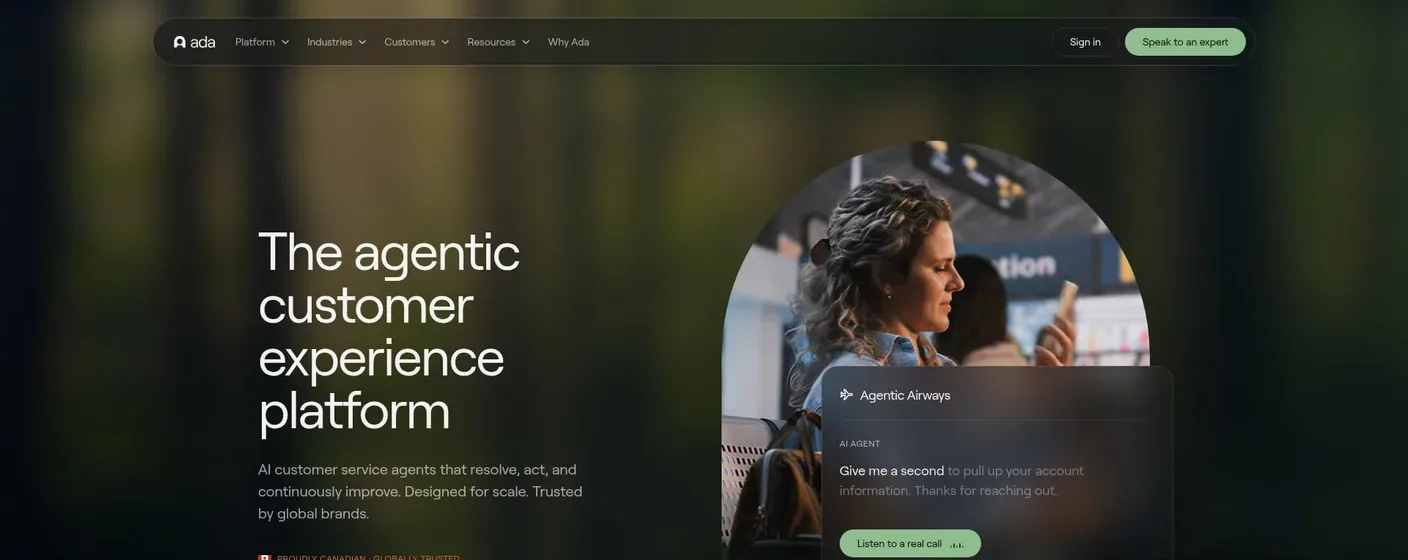
Best for: enterprise contact centers with a procurement team and the patience for a sales cycle.
9. HubSpot Service Hub: support glued to your CRM
If your team already lives in HubSpot for sales and marketing, Service Hub Professional at $90 a seat a month plus the Breeze Customer Agent (roughly $0.50 per resolved conversation, drawn from a monthly credit pool) keeps support in the same system instead of a fourth login. Outside that context, it’s the most expensive entry on this list for what you get, and there’s a separate onboarding fee most reviewers only find after signing.
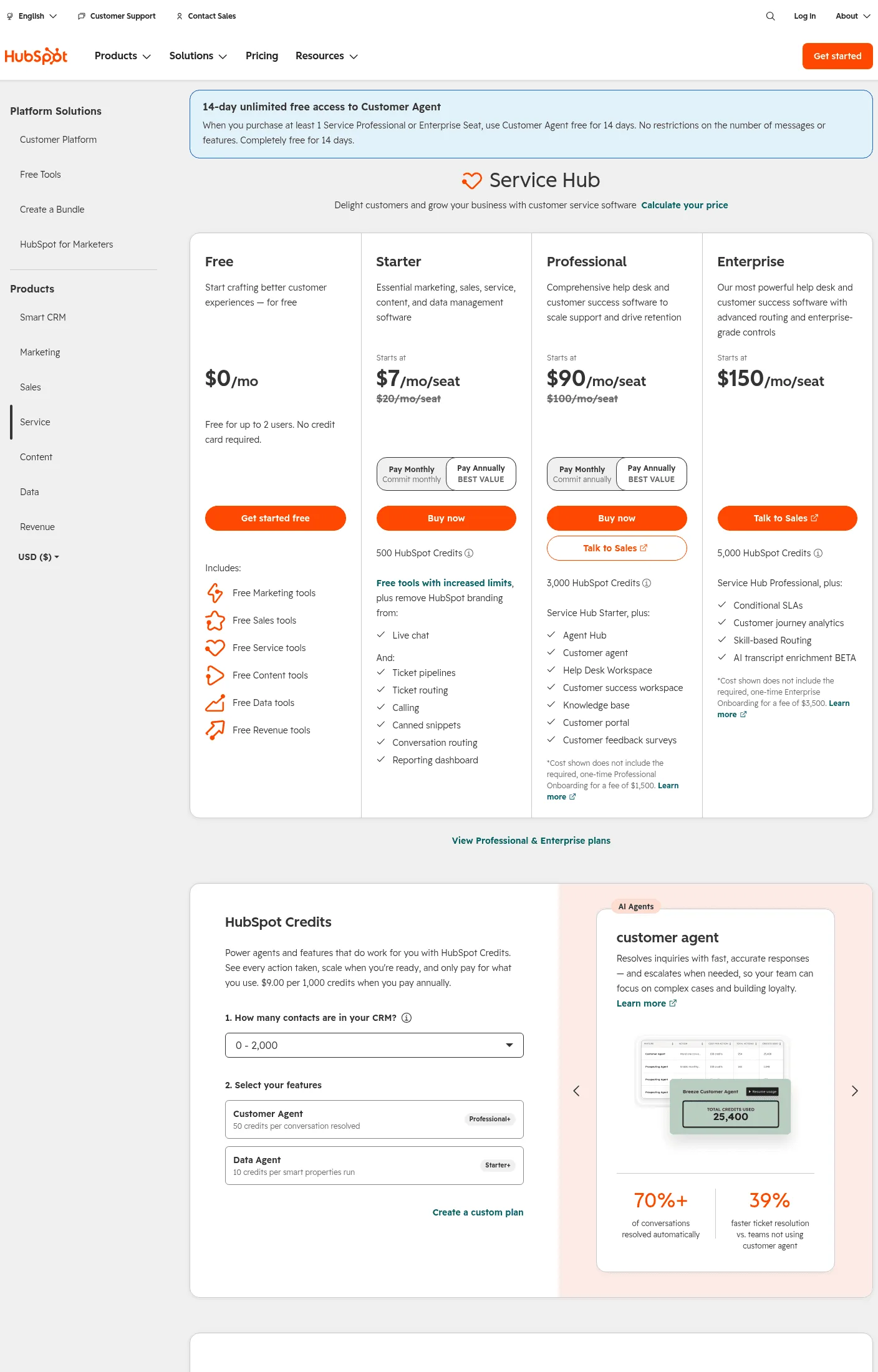
Best for: businesses already deep in HubSpot who want one system of record, not the best support tool in isolation.
10. Tidio: cheap live chat with an AI layer
Tidio is customer service chatbot software at heart, live chat plus a chatbot, that added Lyro, its AI agent, on top. Starter is $24.17 a month for 100 AI conversations, which is genuinely accessible for a small storefront that just needs someone (or something) to answer “do you ship to Canada” at 11pm.
It’s not a helpdesk and doesn’t pretend to be one. Ticket management, phone, and multi-department routing aren’t the point. Tidio also shows up on our ManyChat alternatives list, for teams whose automation started as an Instagram DM bot and needs a website home too.
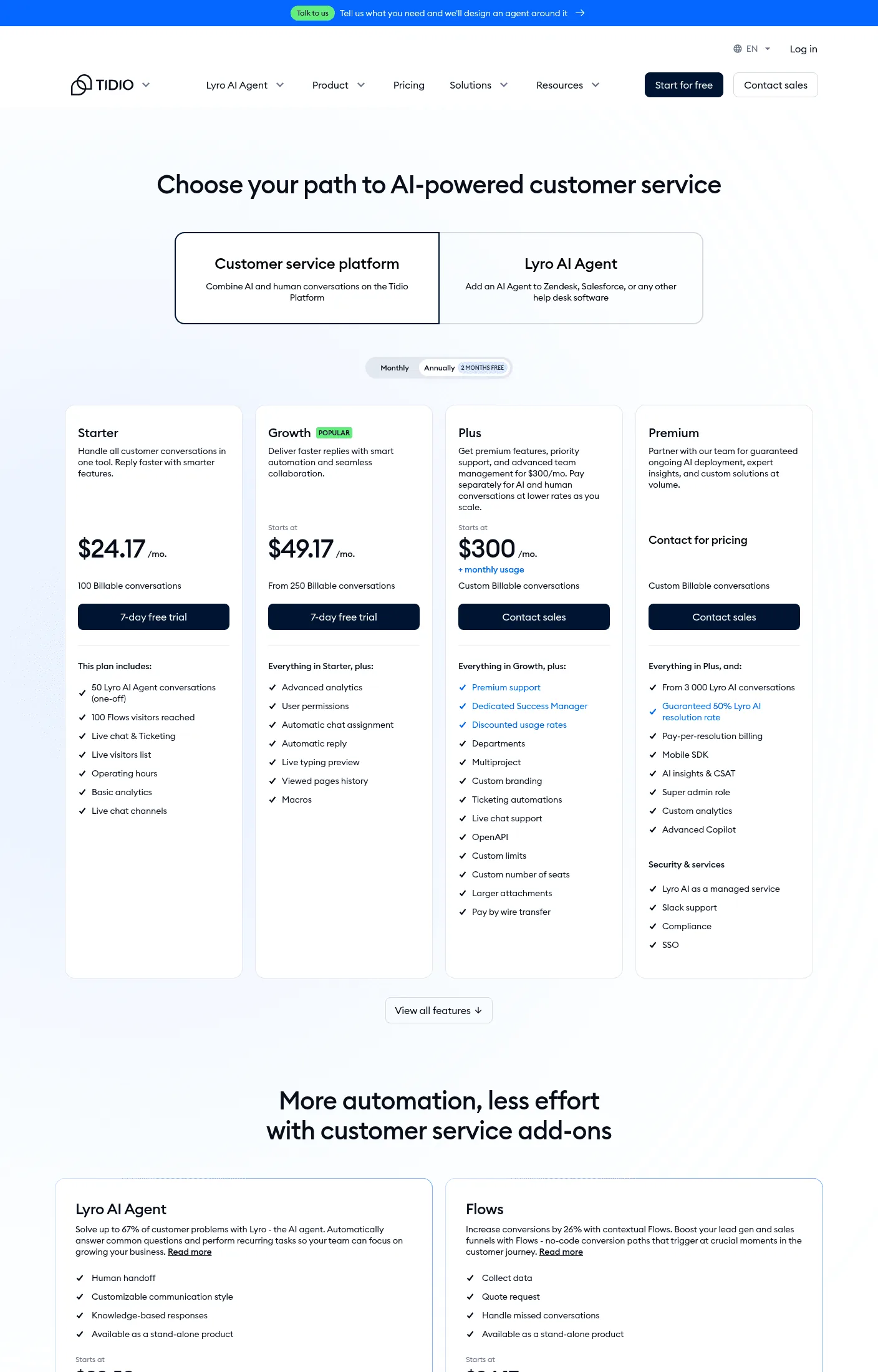
Best for: a small site whose entire support volume is pre-sale chat questions.
How to choose the best customer support automation tools for your team
Start with where your customers already are, not with the feature list. 83% of service leaders say they’re increasing automation spend this year, so you’re not deciding whether to buy one of these, just which one. Pull last month’s support volume by channel. If a real share of it is phone calls, that alone rules out six of the ten tools above, since they either don’t do voice or charge extra for it as an afterthought.
Then look at how each one prices AI, because “AI included” and “AI billed per outcome” are different products wearing the same word.
| Pricing model | Tools | What grows your bill |
|---|---|---|
| Per seat / agent | Zendesk, Help Scout, HubSpot, Zoho Desk | Hiring. A good quarter means a bigger support team and a bigger invoice, whether or not ticket volume grew with it. |
| Per AI outcome / resolution | Intercom, Gorgias, HubSpot’s Breeze add-on | Success. The busier and more automated your support gets, the more each individual month costs. |
| Flat usage credits | We Love Joe | Actual conversation volume, at one predictable rate, whether it’s handled by phone, chat or DM. |
Per-seat pricing punishes you for growing your team. Per-outcome pricing punishes a good month, since the tool gets more expensive exactly when it’s working best. Flat usage pricing is the only one of the three that doesn’t work against you either way, which is a real reason it’s worth asking about before you commit to a seat count you’ll outgrow in a year.
Last, ask what happens when the AI is wrong. Every vendor’s homepage says “escalates to a human when needed.” Fewer of them let you see, in the product, exactly which rule triggered that handoff and why. That’s not a nice-to-have. It’s the difference between an automation you can defend to a customer and one you’re hoping nobody tests.
If you’re running this across more than one location
None of the nine other tools on this list mention franchise networks or multi-location businesses anywhere on their pricing or feature pages, which is strange given how much of the customer support category is exactly that: a gym chain, a pest control franchise, a clinic group, all asking the same twelve questions at every location, all wanting the same answer given the same way everywhere.
The failure mode is specific. A head office builds a solid flow at location one, then location seven’s manager adds a “quick fix” for a local edge case, and eighteen months later no two locations answer a simple hours question the same way. The fix isn’t a flow per location, it’s one flow with per-location variables (hours, address, the manager’s name, which calendar to book into) swapped in automatically, so head office edits the logic once and every location inherits it the same day. That’s a structural decision a tool either supports from day one or bolts on badly later, worth asking about before you’re seven locations deep.
The part none of these tools fix by themselves
Buying any tool on this list without writing down your escalation rules first is how you end up with a chatbot that invents a refund policy. We’ve seen it happen on our own product before we fixed it: a wellness client wanted the agent answering member questions from a knowledge base, and the first version answered a medical question it should have handed off instead. The fix wasn’t a smarter model, it was a rule: anything touching health routes to a human, every time, no exceptions the AI can talk itself into.
That rule has to exist regardless of which tool from this list you pick. The software runs the conversation. The business still has to decide what it’s willing to let AI say on its behalf, and what it isn’t.
Next step
Pull your last 30 days of support conversations and sort them by channel. Whatever tool you pick from this list, that fifteen-minute export tells you more about which one fits than any pricing page will, including ours. If phone shows up with real volume in that list, try Joe on a live conversation before you sign anything that treats it as an add-on.
FAQ
What's actually different between a chatbot and a customer support automation tool?
A chatbot answers questions from a script or a model with no guardrails, which is why it invents refund policies. A customer support automation tool, at least the useful kind, runs a defined flow: it can look things up, take actions like booking or refunding, and hand off to a human, but only inside rules someone set on purpose.
Do any of these tools handle phone calls, not just chat and email?
Three do, and none of them treat it as a first-class channel the way chat is. Ada offers voice as part of its enterprise package, Gorgias sells it as a $25-a-month add-on on top of the helpdesk, and Zendesk includes an IVR phone tree from its middle tier up. Joe is the only one on this list built around phone from the start, same flow as chat, not a bolt-on.
What's the cheapest tool on this list?
By list price, Zoho Desk's Express plan at $7 a user a month, though the AI assistant (Zia) only comes with Professional at $23. By total cost for a small support volume, usage-based pricing usually wins: Joe from €59 a month flat, Gorgias' Basic tier at $77 with AI resolutions billed separately.
Can I run two of these at once, like Zendesk for tickets and a separate AI agent for chat?
You can, and a lot of mid-size teams do exactly that during a migration. It's also how you end up paying two vendors to solve one problem and reconciling two different conversation histories. Every tool on this list except the pure helpdesks (Help Scout, Zoho Desk) is trying to be the whole stack now, which is the entire reason this market reshuffled in the last two years.
How long does it actually take to set one of these up?
A basic helpdesk with canned responses: an afternoon. A genuinely trained AI agent that won't embarrass you: longer than any vendor's homepage claims, because it depends entirely on how messy your existing FAQ and policy documents are, not on the software. Our own target for a non-technical business owner to get a first working agent live is under 15 minutes, and that's a goal we're building toward, not a guarantee for every catalog.
Is AI customer support automation reliable enough for a small business, or is this mainly an enterprise thing?
It flipped. Enterprise bought this category first because they could afford the implementation teams, but usage-based pricing and pre-built flows are what actually make it work for a five-person support team, since a small business can't absorb one bad automated answer the way a call center with a QA department can.